SRT vs VTT: Which Subtitle Format Should You Use?
SRT and VTT are the two most common subtitle formats. Here's the practical difference, when to use each, and how to generate them automatically from any video.
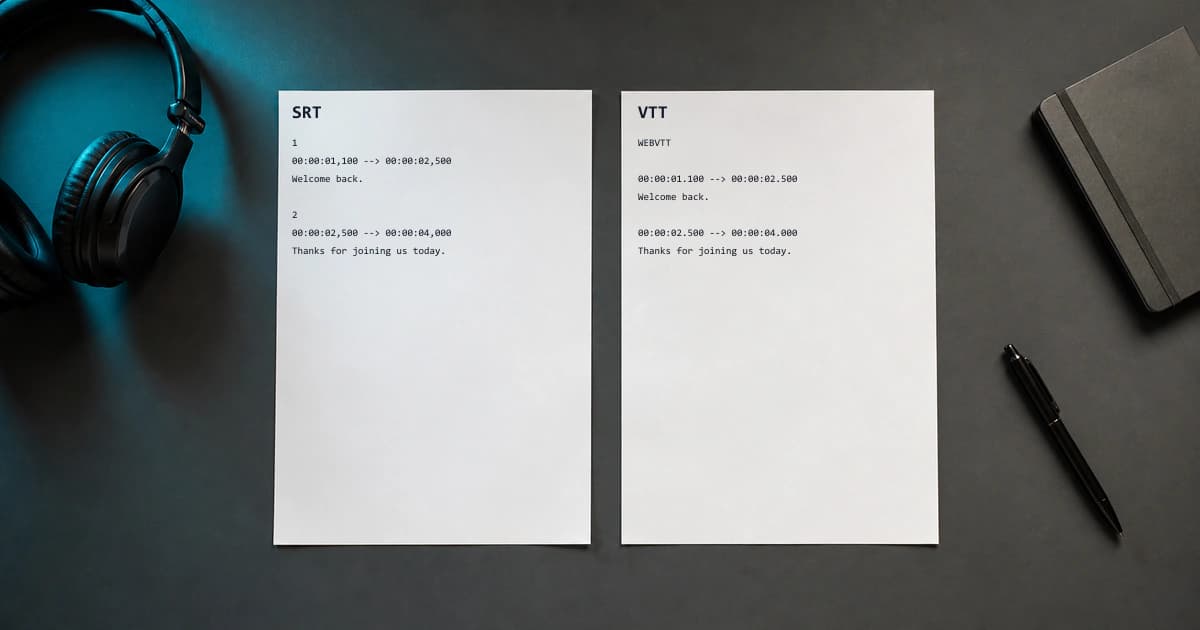
When you export subtitles you'll usually be offered two formats: SRT and VTT. They look almost identical and both work in most players, so which should you pick? Here's the short, practical answer.
What they have in common
Both are plain-text files that list subtitle lines with start and end timecodes. Both are widely supported, human-readable, and easy to edit in any text editor. For most everyday uses they are interchangeable.
SRT — the universal default
SubRip (.srt) is the oldest and most widely supported format. If you're uploading to YouTube, importing into Premiere Pro or DaVinci Resolve, or sending a file to a colleague, SRT is the safest choice because virtually everything accepts it.
VTT — built for the web
WebVTT (.vtt) was designed for HTML5 video. It supports styling, positioning and metadata that SRT can't express, and it's the format the native <track> element expects. If your subtitles will play inside a web page, VTT is the natural fit.
Quick rule of thumb
- Uploading to YouTube, Vimeo, or a video editor → SRT
- Embedding video on your own website with HTML5 → VTT
- Not sure → SRT; it works almost everywhere and converts easily
How to generate subtitles automatically
You don't have to type subtitles by hand. Upload your video or audio to BriefVox, let it transcribe with timecodes, then export either SRT or VTT in one click. You can edit the text first to fix names or terminology, and the timecodes adjust automatically.
Try BriefVox free
Start transcribing →